Show a Day's Tasks
When a staff member signs in, they will be shown under their rank
Tasking for: Friday 11 September
Clock In
From the roster, click on a person's name (hyperlinked). This will split the screen, with a person's tasks on the right hand of the screen
A staff member can click on the hyperlinked task name to mark the task as started or completed; comments may be left on any task (showing a popup):
Hi Yunkin. Your task is:
Sanitize all kitchen and sandwich unit benchtops.
Comments:
Mark task as completed
Note that a PIN may have to be entered by the staff member before this is shown.
The task list will only show that person's tasks by default, but it will be possible to show other peoples' tasks
Tasks which have been finished will not be shown by default
Tasks will initially be shown in order of time scheduled, in the order specified in the task group.
It will be possible to select criteria to display- eg other peoples' tasks
A staff member can take another staff member's tasks, but ot give them to somebody else
The buttons "sign off" and "start break" are for somebody who has clocked on.
If somebody has not yet signed on, only "sign on" will be shown. The member will not be able to complete tasks.
Signing on and off only needs to be a small popup, not a whole screen.
Signing on and off, and completing tasks, will require a PIN.
The roster screen would show the "current" portion.
Clicking anywhere else on the left screen would show the entire day's roster again
A staff member can click on the hyperlinked task name to mark the task as started or completed; comments may be left on any task
A manager can assign tasks or task groups to somebody else
Anybody can assign somebody else's tasks to themselves (or complete somebody else's task)
If there are two people assigned to more than one task group, the first person to sign in picks up all the tasks in that group
Two people assigned to a single list continue to share that group
If a person signs out before completing, the tasks are inherited by somebody else
PIN will have to be entered for completing a task (Except within 30 seconds of completing a previous task)
Tasks can be taken from somebody; a senior person can reallocate, but a staff member cannot give away tasks
Person logging on:
Mohammed Ahmed (MohammedA)
Tom Brown (TomB)
Brian Chen (Brian_C)
Minh Nguyen (Minh)
Nazir Rahman (Nazir)
Dustin Schmidt (Dustin)
John Smith (John_Smith)
Susan Zimmermen (SusanZ)
Log On
Hi Brian. Please enter your PIN:
PIN:
Log On
Hi Brian.
Message
From John Smith (Administrator):
Please ensure that dates on all prepared food have been checked.
Acknowledge message as read
Message
From David Jones (Owner):
We have a new two for one special available. Please read information displayed on the fridge door.
Acknowledge message as read
Log On
 Show a Day's Tasks
Show a Day's Tasks
Show a Day's Tasks
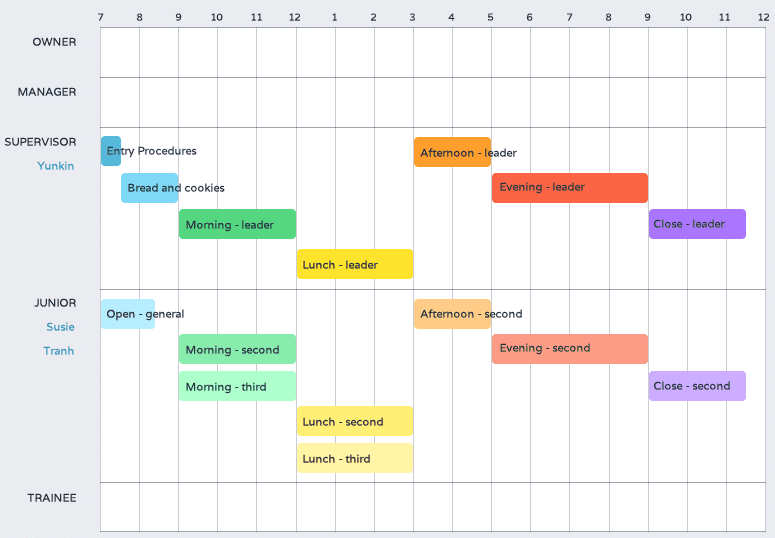 From the roster, click on a person's name (hyperlinked). This will split the screen, with a person's tasks on the right hand of the screen
